Appendix
A. Snakes and Crabs
2.1.1 Are You Rustic?
B. Fields
C. Sequences, Series, and Limits
D. Junk
4.3 From Sequential Machines to Parallel Machines
The opening call to adventure in Part I. Elements of Networks invited the programmers of Silicon Valley to take a similar journey between the tension of the finite and infinite that the Ancient Greeks took. That is, to contribute towards this new approach of augmenting and amplifying human intelligence, they must climb back down from their current pitch in programming algorithms of sets, maps, lists, trees, and graphs on serial machines to optimizing the distributions of scalars, vectors, matrices, tensors, and neural networks on massively parallel machines. Now is the time to add that final element. That of parallel programming on NVIDIA GPUs with CUDA Rust.

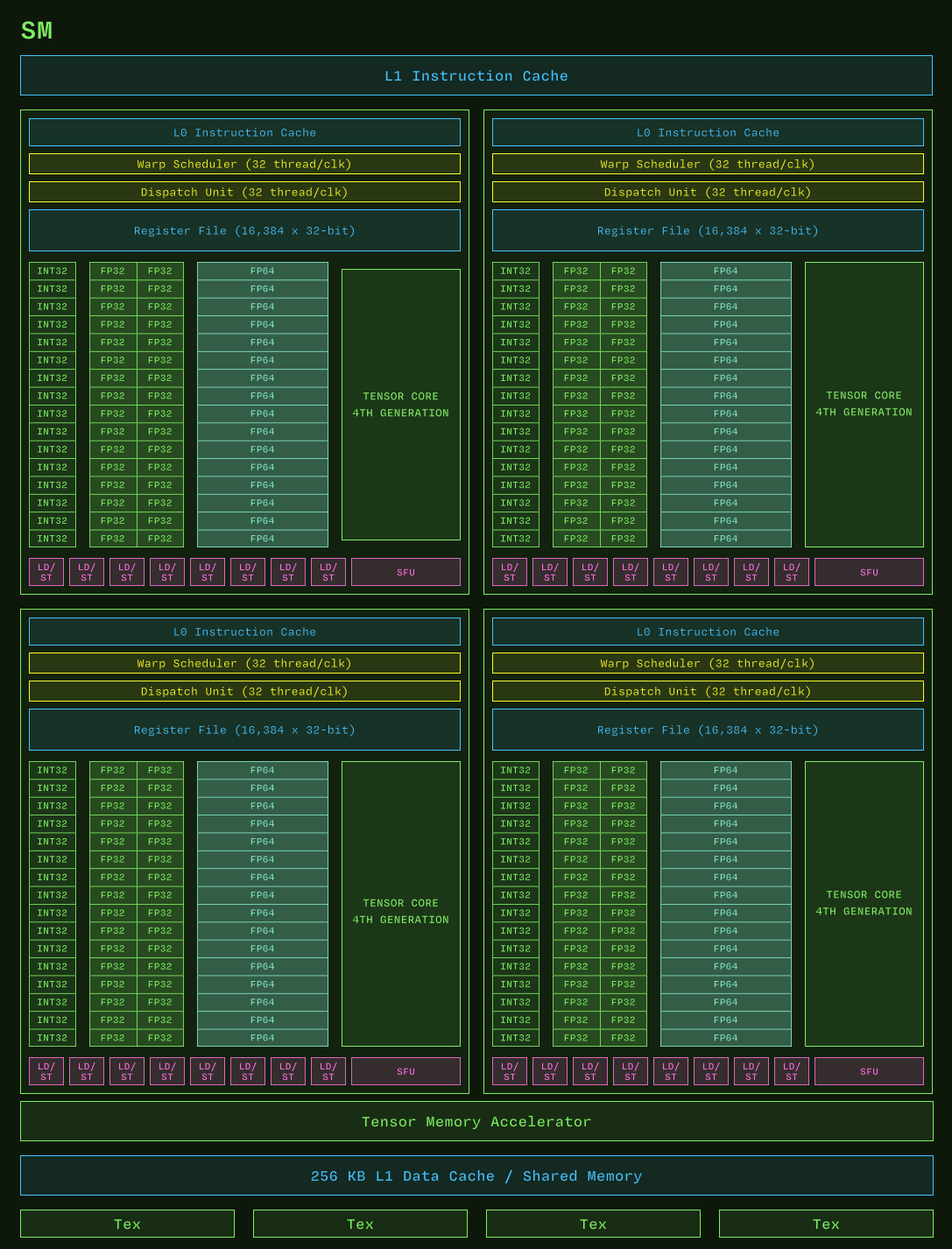
From Modal GPU Glossary (Streaming Multiprocessor), modified from a diagram in Fabien Sanglard’s blog, itself likely modified from a diagram in the CUDA C Programming Guide.
Lorem ipsum dolor sit amet, consectetur adipiscing elit. Donec aliquam varius mi, pharetra scelerisque nulla vehicula ut. Cras ac faucibus dolor. Nunc tempus efficitur ultricies. Nullam non fermentum elit, et tincidunt ante. Donec hendrerit metus ac urna semper, in facilisis leo egestas. Integer sit amet quam ultrices, dapibus sem a, volutpat velit. Pellentesque eget ipsum consequat sem luctus blandit a et nibh. Mauris gravida felis ut dignissim volutpat. Quisque volutpat pulvinar enim in venenatis. Integer posuere tincidunt leo vel congue. Sed ex velit, posuere ut nibh nec, ultrices malesuada nibh. Fusce scelerisque mollis neque id fringilla. Etiam rhoncus quam a leo ultrices rutrum non vitae est. Donec bibendum, arcu sagittis consequat vestibulum, lectus elit bibendum libero, non rhoncus lorem lorem a neque. Sed ex felis, rutrum non consequat eget, tincidunt ac lacus.

Nulla quis dictum diam, a cursus nibh. Pellentesque magna ante, lobortis a aliquam at, imperdiet eget magna. Nam pharetra dolor lectus, eu hendrerit ipsum tincidunt molestie. Cras eget viverra ipsum. Cras consequat metus quis nibh fermentum, egestas vestibulum odio lacinia. Donec ut ante hendrerit, convallis sem pulvinar, pulvinar magna. Etiam consequat mattis turpis non mollis. Sed consequat et sem quis interdum. Vivamus blandit elementum tortor non convallis. Duis quis nunc nisi. Fusce scelerisque felis pellentesque ex elementum imperdiet. Nulla facilisi. Nunc molestie urna sit amet nisl ullamcorper, at convallis augue tempor.
https://nvlabs.github.io/cuda-oxide/getting-started/hello-gpu.html#install-cargo-oxide
So with that all said and done, let us extend the mixed source of Python and Rust for 
borscht with a third language for the devicedevice.
Recall that in §2.1.1 From Virtual to Physical Machines we installed the Rust toolchain so that rustc could translate our program into the machine language of a physical processor. That toolchain is still necessary, but it is no longer sufficient, because the physical machine we are now targeting is not the one running our program. A GPU program is really two programs — the hosthost program which runs on the CPU and orchestrates memory and launches, and the devicedevice program of kernelskernels which runs on the GPU. The two are compiled by two different compilers, for two different instruction sets, and then stitched back together.
Historically the device half of that pair was written in CUDA C++ and compiled by NVIDIA’s nvcc, which meant that a Rust deep learning framework had to reach across a foreign function interface to say anything to the GPU at all. We will not do that. Instead we will keep host and device in the same file and the same language by way of cuda-oxidecuda-oxideSee NVlabs/cuda-oxide. It is explicitly alpha software: expect bugs and API breakage., a codegen backendcodegen backend for rustc which compiles functions annotated #[kernel] down to PTXPTX, the virtual instruction set of NVIDIA GPUsPTX is virtual in exactly the sense of §2.1.1 — it is not what the silicon executes. The driver finishes the job, lowering PTX to the SASSSASS of your particular chip at load time.. Note that this is the same turtle we met in Part I: rustc never emitted x86 directly either, it emitted LLVM. Here it emits LLVM too, only the backend of that backend is NVPTX instead of X86.
So the toolchain grows a device half:
| host | device | |
|---|---|---|
| compiler | rustc | rustc + rustc-codegen-cuda |
| target | x86-64, ARM, RISC-V | PTX → SASS |
| driver | cargo | cargo oxide |
| runtime | — | CUDA Toolkit + NVIDIA driver |
Concretely, you need five things. A Linux machine with an NVIDIA GPU and a driverdriver new enough for your toolkit. The CUDA ToolkitCUDA Toolkit (12.x or newer), which supplies nvcc, libNVVM, nvJitLink and libdevice. LLVM 21 or newer, whose llc performs the final lowering from LLVM IR to PTXThis floor is not negotiable for modern chips. The backend emits TMA, tcgen05 and WGMMA intrinsics that llc from LLVM 20 and earlier cannot lower — simple kernels may survive on an older llc, but anything Hopper or Blackwell will not.. Clang 21 with its development headers, because the host bindings are generated by bindgen, which loads libclang and wants clang’s own stddef.h. And a Rust nightly, pinned by rust-toolchain.toml, carrying the rust-src, rustc-dev and llvm-tools components — nightly because a codegen backend plugs into rustc’s own internals, which are not a stable interface.
That is a long enough list that the honest advice is to not install it by hand. The repository ships a development containerdevelopment container which pins every one of the five, so the only things your host must provide are the NVIDIA driver and the NVIDIA Container ToolkitInstalling the container toolkit is not quite the whole story: it must also be registered with the container runtime, via sudo nvidia-ctk runtime configure --runtime=docker followed by a daemon restart. Without that step --gpus=all has no runtime to bind to and the container starts with no GPU.. The CUDA Toolkit itself never touches your machine.
> root@machine ~/ $ git clone https://github.com/NVlabs/cuda-oxide.git
> root@machine ~/ $ devcontainer up --workspace-folder cuda-oxide
> root@machine ~/ $ devcontainer exec --workspace-folder cuda-oxide bash
Those with Nix may prefer nix develop, which gives the same guarantee by a different road. Those who insist on installing to the metal should consult the project’s installation chapter; the one step people trip on is LLVM, since most distributions do not package a version recent enough, and you will want llvm.sh:
> root@machine ~/ $ wget https://apt.llvm.org/llvm.sh && chmod +x llvm.sh && sudo ./llvm.sh 21
> root@machine ~/ $ llc-21 --version | grep nvptx
    nvptx      - NVIDIA PTX 32-bit
    nvptx64    - NVIDIA PTX 64-bit
However you arrive, the toolchain is driven by cargo oxide, a cargo subcommandcargo subcommand standing in the same relation to cargo that cargo stands to rustc. Inside the cuda-oxide repository it resolves through a workspace alias and works immediately; for a project of our own, such as borscht, it must be installed against the pinned nightly:
> root@machine ~/ $ cargo +nightly-2026-04-03 install --git https://github.com/NVlabs/cuda-oxide.git cargo-oxide
    Installing /usr/local/cargo/bin/cargo-oxide
     Installed package `cargo-oxide v0.2.1` (executable `cargo-oxide`)
Before writing a line of our own, ask it whether the machine is in order. cargo oxide doctor is the whole of the preceding discussion turned into a checklist, and it is worth reading line by line, because every entry is a piece of the pipeline we just described:
> root@machine ~/ $ cargo oxide doctor
cargo-oxide environment check
==============================
Rust nightly toolchain... ✓ rustc 1.96.0-nightly (55e86c996 2026-04-02)
rust-toolchain.toml... ✓ channel nightly-2026-04-03
Pinned toolchain active... ✓ nightly-2026-04-03-x86_64-unknown-linux-gnu
Required rustup components... ✓ rust-src, rustc-dev, rust-analyzer, clippy, rustfmt, llvm-tools
Codegen backend... - not built yet (run `cargo oxide setup`)
CUDA headers (cuda.h)... ✓ /usr/local/cuda/include/cuda.h
CUDA toolkit (nvcc)... ✓ Cuda compilation tools, release 13.0, V13.0.48
libNVVM (libnvvm.so)... ✓ libNVVM 2.0
nvJitLink (libnvJitLink.so)... ✓ nvJitLink 13.0
libdevice (libdevice.10.bc)... ✓ /usr/local/cuda/nvvm/libdevice/libdevice.10.bc
llc (LLVM)... ✓ Ubuntu LLVM version 21.1.8 (/usr/bin/llc-21)
clang / libclang resource dir... ✓ /usr/lib/llvm-21/lib/clang/21
NVIDIA driver / GPU... ✓ NVIDIA A100-SXM4-40GB (compute capability 8.0, driver 580.105.08)
cuda-gdb (optional)... ✓ /usr/local/cuda/bin/cuda-gdb
compute-sanitizer (optional)... ✓ Version 2025.3.0.0
✅ Environment looks good!
Two of those lines deserve a second look. The compute capabilitycompute capability 8.0 is the generation of the chip — sm_80 is Ampere, sm_90 Hopper, sm_100 Blackwell — and it is what decides which instructions are available to us in §4.4; you will meet it again as the thing that makes a kernel fast on one machine and illegal on another. And the codegen backend reported as not built yet is not an error: it is a compiler, rustc-codegen-cuda, and cargo oxide will build and cache it for you on first use.
Now we can scaffold, exactly as maturin new scaffolded the Python and Rust halves of borscht back in §2.1.2:
> root@machine ~/ $ cargo oxide new borscht-cuda
✓ Created cuda-oxide project 'borscht-cuda'

  cd borscht-cuda
  cargo oxide doctor
  cargo oxide run

> root@machine ~/ $ cd borscht-cuda && ls
Cargo.toml
README.md
rust-toolchain.toml
src
[package]
name = "borscht-cuda"
version = "0.1.0"
edition = "2024"

[workspace]

[dependencies]
cuda-device = { git = "https://github.com/NVlabs/cuda-oxide.git" }
cuda-host = { git = "https://github.com/NVlabs/cuda-oxide.git" }
cuda-core = { git = "https://github.com/NVlabs/cuda-oxide.git" }
[toolchain]
channel = "nightly-2026-04-03"
components = [
    "rust-src",
    "rustc-dev",
    "rust-analyzer",
    "clippy",
    "rustfmt",
    "llvm-tools",
]
The three dependencies partition the problem the same way the machine does. cuda-device is the vocabulary of the device — #[kernel], thread::index_1d(), the indexing types — and it is the crate whose code rustc-codegen-cuda will consume. cuda-core is the host-side runtime of contexts, streams and buffers. cuda-host supplies #[cuda_module], the macro that welds the two halves together by embedding the compiled device artifact into the host binary and generating a typed launch method for each kernel. And the pinned rust-toolchain.toml is what makes the earlier +nightly-2026-04-03 unnecessary from here on: rustup reads it and selects the toolchain on every cargo invocation, fetching llvm-tools on first use.
The generated src/main.rs is the smallest complete example of the shape all of our kernels will take, and it repays a careful reading before we write our own:
use cuda_device::{kernel, launch_bounds, launch_contract, thread, DisjointSlice};
use cuda_host::cuda_module;
use cuda_core::{CudaContext, DeviceBuffer, LaunchConfig1D};

#[cuda_module]
mod kernels {
    use super::*;

    #[kernel]
    #[launch_bounds(256)]
    #[launch_contract(domain = 1, block = (256, 1, 1))]
    pub fn vecadd(a: &[f32], b: &[f32], mut c: DisjointSlice<f32>) {
        let idx = thread::index_1d();
        let idx_raw = idx.get();
        if let Some(c_elem) = c.get_mut(idx) {
            *c_elem = a[idx_raw] + b[idx_raw];
        }
    }
}

fn main() -> Result<(), Box<dyn std::error::Error>> {
    let ctx = CudaContext::new(0)?;
    let stream = ctx.default_stream();

    const N: usize = 1024;
    let a_host: Vec<f32> = (0..N).map(|i| i as f32).collect();
    let b_host: Vec<f32> = (0..N).map(|i| (i * 2) as f32).collect();

    let a_dev = DeviceBuffer::from_host(&stream, &a_host)?;
    let b_dev = DeviceBuffer::from_host(&stream, &b_host)?;
    let mut c_dev = DeviceBuffer::<f32>::zeroed(&stream, N)?;

    // SAFETY: this package owns the embedded device bundle produced for the
    // kernels module above.
    let module = unsafe { kernels::load(&ctx)? };
    let prepared = module.prepare_vecadd(LaunchConfig1D::new((N as u32).div_ceil(256), 256, 0))?;
    module.vecadd(&stream, &prepared, &a_dev, &b_dev, &mut c_dev)?;

    let c_host = c_dev.to_host_vec(&stream)?;
    println!("{:?}", &c_host[..5]);
    Ok(())
}
Everything above the fn main runs on the GPU and everything below it runs on the CPU, in one file, in one language, built by one command. Notice that the ownership we learned in Part I has followed us across the bus: a_dev and b_dev are borrowed immutably by the launch while c_dev is borrowed mutably, and the DisjointSlice<f32> in the kernel signature is the device-side statement that no two threads will write the same element. The data race that is the traditional first lesson of GPU programming is here a borrow checkerborrow checker error.
Building it will take a moment the first time, because cargo oxide must build the codegen backend before it can build anything with it:
> root@machine ~/ $ cargo oxide run
Building rustc-codegen-cuda backend...
    Finished `dev` profile [unoptimized + debuginfo] target(s) in 1m 06s
✓ Backend built: .../librustc_codegen_cuda.so
Detected GPU arch: sm_80 (via nvidia-smi)
    Finished `release` profile [optimized] target(s) in 22.04s
     Running `target/release/borscht-cuda`
[0.0, 3.0, 6.0, 9.0, 12.0]
Four numbers added on a hundred billion transistors. It is not much, but every matrix multiplication in §4.4 is that same skeleton with a better kernel inside it, and it is worth knowing two more subcommands before we go there, since we will lean on both: cargo oxide inspect prints the PTX that came out the far end of the pipeline, and cargo oxide pipeline prints every intermediate along the way, from Rust MIR through dialect-mir and LLVM IR to PTX. When a kernel is slow or wrong, that is where you look.
GPU MODE Lecture 3: Getting Started With CUDA for Python Programmers
GPU MODE Lecture 5: Going Further with CUDA for Python Programmers
GPU MODE Lecture 2: Ch1-3 PMPP book
GPU MODE Lecture 4: Compute and Memory Basics (Ch4-5 PMPP)
#![allow(unused)]
fn main() {
enum Device {
    Cpu,
    Gpu
}

enum Dtype {
    Float64(f64),
    Float32(f32),
    Float16(f16),
    Bfloat16(bf16),
}

struct Tensor {
    shape: Vec<u8>,
    stride: Vec<u8>,
    device: Device,
    dtype: Dtype,
    storage: Vec<Dtype>
}
}
2.3 From Performance Primitives to Linear Solvers
Table of Contents (§2. The Massively Parallel Multidimensional Tensor)
2.4 Accelerating Matrix Multiplication on GPUs
In which we …
4.3.1 From Multi Core CPUs to Many Core GPUs
#![allow(unused)]
fn main() {
// gpu_host.rs
use cudarc::{driver::{self, PushKernelArg}, nvrtc};
use src_device::T; // shared type with device code
static PTX: &str = include_str!(concat!(env!("OUT_DIR"), "/gpu_device.ptx")); // Embed the PTX code as a static string.

pub fn cudars_helloworld() -> Result<(), Box<dyn std::error::Error>> {
  // initialize device context and stream via driver api
  let process = driver::CudaContext::new(0)?; // device 0
  let queue = process.default_stream();

  // load ptx via nvrtc
  let dylib = process.load_module(nvrtc::Ptx::from_src(PTX))?;
  let add_kernel = dylib.load_function("add")?;

  // allocate on device
  let (a, b): ([T; _], [T; _]) = ([1.0, 2.0, 3.0, 4.0], [2.0, 3.0, 4.0, 4.0]);
  let (a_gpu, b_gpu, mut c_gpu) = (queue.clone_htod(&a)?, queue.clone_htod(&b)?, queue.alloc_zeros::<T>(a.len())?);
  let (a_len, b_len) = (a_gpu.len(), b_gpu.len());

  let cfg = driver::LaunchConfig { grid_dim: (1, 1, 1), block_dim: (4, 1, 1), shared_mem_bytes: 0, };
  unsafe {
    queue
    .launch_builder(&add_kernel).arg(&a_gpu).arg(&a_len).arg(&b_gpu).arg(&b_len).arg(&mut c_gpu)
    .launch(cfg)?;
  }
  queue.synchronize()?;

  let c = queue.clone_dtoh(&c_gpu)?;
  println!("c from cuda is = {:?}", c);
  Ok(())
}
}
#![allow(unused)]
fn main() {
// gpu_device.rs
use cuda_std::kernel;
use crate::T;
#[allow(improper_ctypes_definitions)]
#[kernel] pub unsafe fn add(a: &[T], b: &[T], c: *mut T) {
let i = cuda_std::thread::index_1d() as usize;
if i < a.len() {
let elem = unsafe { &mut *c.add(i) };
*elem = a[i] + b[i];
}
}
#[allow(improper_ctypes_definitions)]
#[kernel] pub unsafe fn saxpy(a: &[T], b: &[T], c: *mut T) {
let i = cuda_std::thread::index_1d() as usize;
todo!()
}
#[allow(improper_ctypes_definitions)]
#[kernel] pub unsafe fn smul(a: &[T], b: &[T], c: *mut T) {
let i = cuda_std::thread::index_1d() as usize;
todo!()
}
#[allow(improper_ctypes_definitions)]
#[kernel] pub unsafe fn stanh(a: &[T], b: &[T], c: *mut T) {
let i = cuda_std::thread::index_1d() as usize;
todo!()
}
}4.3.2 From CUDA Rust to PTX
4.3.3 Accelerating SGEMV on sm80 (Ampere)
4.3.4 Accelerating SGEMM on sm90 (Hopper)
4.3.5 Accelerating SGEMM on sm90 (Hopper)
4.3.6 Accelerating SGEMM on sm100 (Blackwell)
Intermezzo Two: The Language of Numerical Analysis
Fixed-Size DataA modified excerpt from How to Design Programs (Felleisen et al. 2018)’s Intermezzo 1: Beginning Student Language §1. Self-Supervised Sequence Learning with Single-Layer Networks deals withBSLborscht.Tensoras if it were a natural language. It introduces the “basic words” of the language, suggests how to compose “words” into “sentences,” and appeals to your knowledge of algebra for an intuitive understanding of these “sentences.” While this kind of introduction works to some extent, truly effective communication requires some formal study.
In §2. The Massively Parallel Multidimensional Tensor,
you have implemented your first language models by using of the stochasticity from
probability theory with the goal of next-token prediction and the dimensionality from linear algebra with the specification of single-layer networks with the borscht.Tensor. While we’ve used such objects algebraically and computationally,
the producing such objects and their properties requires
precisely describing the definitional what
and rigorously proving the logical why.
In more highfalutin-speak, they are the highest standard when it comes to making ontological and epistemological statements about reality.
This is what is done in the formal treatment of mathematics, which as the opening quote suggests, is required for truly effective communication. Unlike the Intermezzo’s in HTDP which provide formal treatment of the primitives of software 1.0, we will do so with that of software 2.0.
linear algebra library is aspirational
“vectors” and “matrices”, but these are just rank 1 and rank 2 arrays. ignore a vector are coordinates of some basis, matrix is a linear map, which depends that the scalars are from a field (that is, addition is associative!). this goes away with IEEE754!
we still use the same notation. Householder convention. we say mathematical terms, but mean their computational representations.